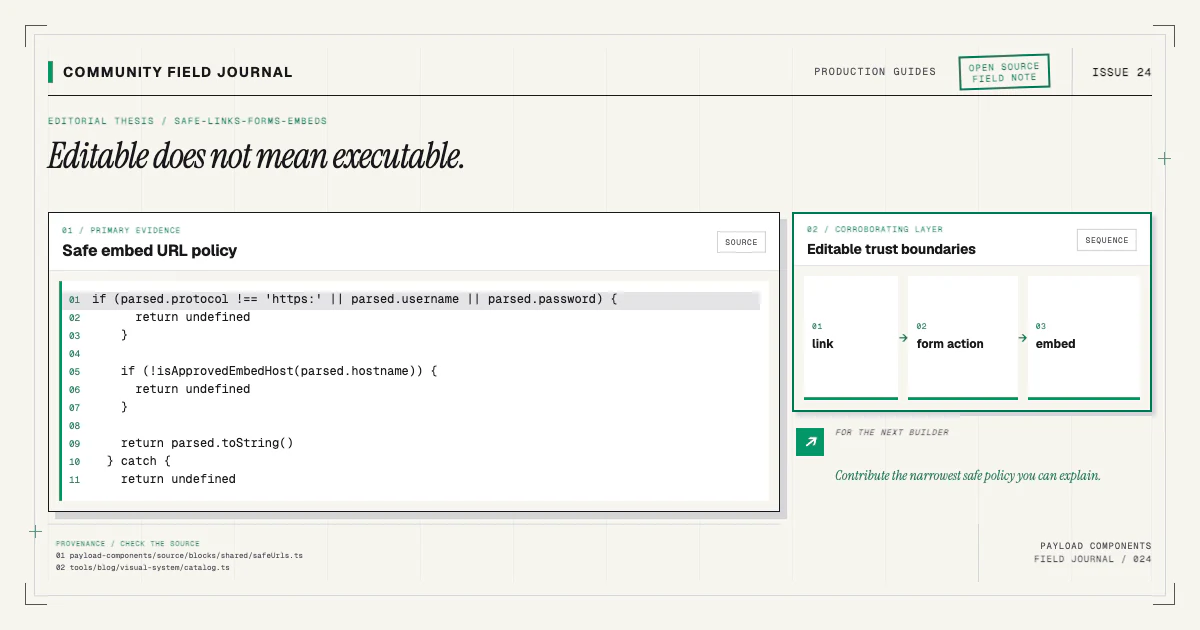
A CMS makes content editable; it does not make every stored value safe to execute. URLs can contain dangerous protocols. Forms cross from untrusted browser input into server effects. Embed HTML can run third-party scripts in the site's origin. The component boundary needs a clear policy for each.
I prefer constrained fields over executable markup. An editor chooses an internal page or an allowed external URL for a link. The CTA stores a constrained same-origin action path. EmbedBasic stores an approved HTTPS URL with its title and presentation fields; neither accepts pasted HTML.
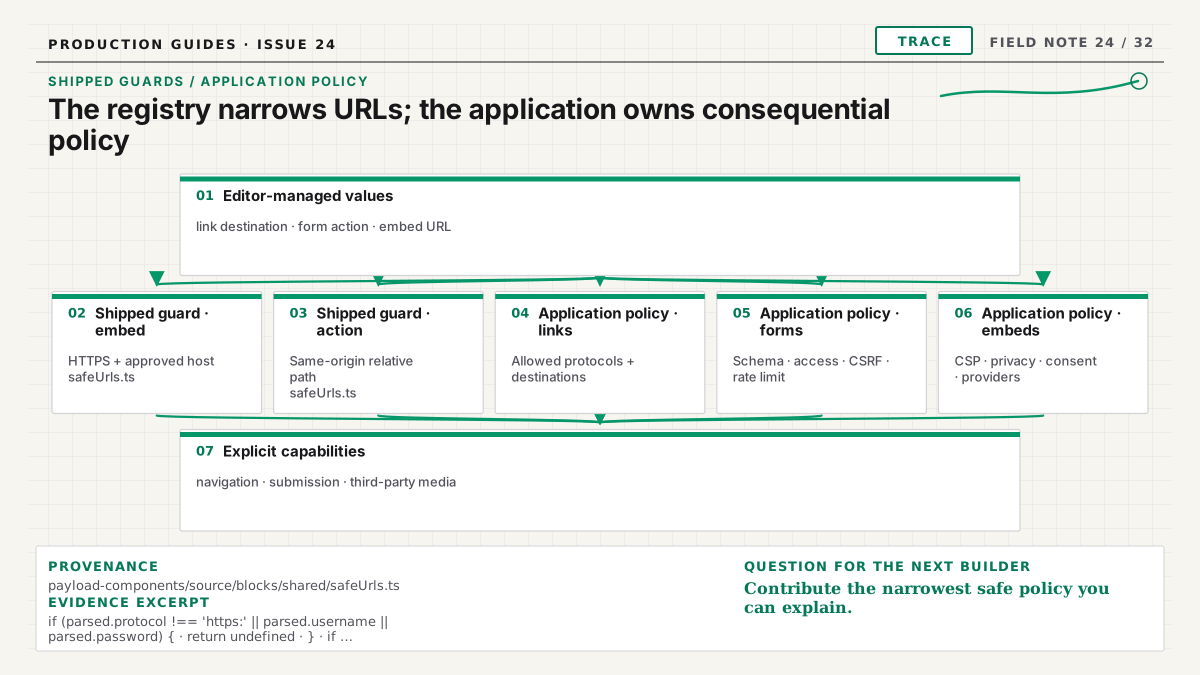
The shipped safeUrls.ts makes two narrow guarantees: an embed URL must use HTTPS on an approved
host, and a form action must normalize to a same-origin path. It does not define the application's
general link policy or implement the submission handler, CSRF protection, rate limiting, CSP, or
privacy decisions. Those controls are application-owned and need local policy and tests.
Model links by destination type
A shared link group can distinguish an internal relationship from a custom URL:
{
  name: 'link',
  type: 'group',
  fields: [
    {
      name: 'type',
      type: 'radio',
      options: ['reference', 'custom'],
      defaultValue: 'reference',
    },
    {
      name: 'reference',
      type: 'relationship',
      relationTo: ['pages', 'posts'],
      admin: { condition: (_, siblingData) => siblingData?.type === 'reference' },
    },
    {
      name: 'url',
      type: 'text',
      admin: { condition: (_, siblingData) => siblingData?.type === 'custom' },
    },
    { name: 'label', type: 'text', required: true },
  ],
}
Admin conditions improve authoring but are not enforcement. Historical and API-written data may contain both branches. Validate the selected destination server-side and make the renderer choose one explicitly.
Internal references survive slug conventions better than manually typed paths. They also participate in access and population behavior, so narrow ID versus document values and decide what happens when a referenced page is unpublished.
Allow known URL protocols
For custom URLs, parse with the platform URL API where possible and allow the protocols the component
needs, usually https: and http:. Add mailto: or tel: only through fields and rendering that
understand their specific semantics. Reject javascript:, unexpected data URLs, and malformed values.
Relative paths can be valid internal destinations, but define their accepted form rather than
concatenating strings. Protocol-relative URLs beginning // deserve an explicit decision because
they leave the scheme to the current page.
Do not validate solely with a prefix check such as startsWith('http'). URL parsing, normalization,
and an allowlist are clearer. Render the final value through one shared component so every block uses
the same policy.
The production block config guide explains why field validation and resilient React behavior work together.
Preserve link semantics
Use <a> or Next.js Link for navigation and <button> for an action that changes local state.
Visual design does not change semantics. A call-to-action styled as a button is still a link when it
navigates.
Avoid wrapping an entire complex card in a link when the card also contains links or controls. Use a clear heading link and, if desired, a pseudo-element for pointer affordance without creating nested interactive content.
For external links opened in a new tab, use the appropriate rel behavior and give users enough
context. Do not force every external destination into a new tab. Accessible labels should describe
the destination, not say “click here.”
Treat forms as server operations
The Payload block can model form presentation and a constrained same-origin action path. That path
selects a local endpoint; it does not grant the request permission or define the server behavior.
Validate every submitted value against a server schema. Apply access rules, authentication, CSRF protection, rate limiting, spam controls, and logging according to the consequence. Do not trust a hidden input merely because the component generated it. A user can submit any HTTP request.
If the server calls Payload's Local API with a user, set overrideAccess: false. Otherwise, passing
the user does not automatically guarantee collection access is enforced. Inside Payload hooks, pass
req to nested operations so the transaction and request context remain connected.
Do not treat a same-origin action as authorization. Keep accepted paths limited to application routes you intend to expose, and make every handler enforce its own schema, access, and abuse controls. The editor can choose a local destination; they cannot redefine its security boundary.
Keep secrets and provider keys on the server
Component fields are stored content and may be exposed through APIs. Do not place secret API keys, webhook secrets, or private tokens in a block config. Store them in the deployment's secret system and reference a provider by a nonsecret identifier.
Public keys designed for browser use still need domain restrictions and server-side verification where the provider supports it. A “public” key is not a substitute for limiting the operation it can perform.
Error messages shown to readers should be useful without exposing stack traces, provider responses, or internal identifiers. Log diagnostic detail on the trusted side with appropriate redaction.
Model embeds as an approved URL, never raw HTML
Pasted iframe or script HTML gives an editor the ability to introduce arbitrary origins, permissions,
tracking, and executable content. EmbedBasic instead stores an approved HTTPS embed URL, a required
accessible title, an aspect ratio, an optional caption, and a fullscreen preference:
{
  name: 'url',
  type: 'text',
  required: true,
  validate: validateEmbedUrl,
}
The React component calls getSafeEmbedUrl, applies a constrained allow policy, sets the stored
title, reserves the selected aspect ratio, and lazy-loads the iframe. If the URL is not allowed, it
renders an unavailable state instead of raw HTML.
Content Security Policy should allow only required frame and script origins. The component model and CSP reinforce each other: one controls what source can request; the other limits what the browser can load.
The catalog's Embed Basic documentation provides a concrete component surface to inspect.
Consider privacy before loading third parties
Third-party embeds can send IP address, user agent, referrer, and cookies before a person interacts. Use privacy-enhanced provider modes where available, defer loading until consent when required by the site's policy, or render a thumbnail and explicit activation button.
Do not claim a generic component establishes legal compliance. Requirements depend on jurisdiction, provider, site policy, and implementation. The component can make a privacy-conscious path possible through controlled providers and deferred loading.
Keep a plain link fallback. It helps when scripts are blocked, consent is declined, the provider is unavailable, or an assistive setup handles the external content better on its source site.
Sanitize rich content at the right boundary
Payload's structured rich-text representation is safer to render through a controlled serializer than accepting raw HTML strings. Enable only nodes and custom blocks the application supports. Escape text by default. If trusted HTML is truly required, sanitize it with a maintained policy on the server and still apply CSP.
React escapes string interpolation, but dangerouslySetInnerHTML intentionally bypasses that
protection. A value being entered by an authenticated editor does not make it harmless; accounts can
be compromised, content can be imported, and mistakes happen.
The same rule applies to SVG, style attributes, and script-like URL contexts. Validate for the exact sink, not through one vague “sanitized” flag.
Test abuse cases alongside happy paths
For links, test malformed URLs, mixed case protocols, leading whitespace, relative paths, unpublished references, and accessible labels. For forms, test missing fields, oversized input, repeated requests, forged identifiers, unauthorized users, server failure, and a safe retry. For embeds, test an unknown provider, malformed identifier, CSP rejection, consent-off state, and keyboard access to the fallback.
Browser tests should confirm no nested interactive elements, visible focus, and no horizontal overflow from long URLs. Server tests should call handlers directly with hostile input rather than assuming the component is the only client.
Install source, then apply your policy
The registry can provide a safe structural baseline, but your application's allowed destinations, form consequences, CSP, privacy requirements, and access rules remain local decisions. Install and review a concrete embed block:
npx payload-components add embed-basicInspect the architecture boundary, replace fixture providers with your allowlist, and add tests for your threat model. If a shared component accepts a value it cannot render safely, bring the failing case and a constrained field proposal through the contributing guide. The permanent fix is a narrower capability, not a warning asking editors to paste carefully.